|
|
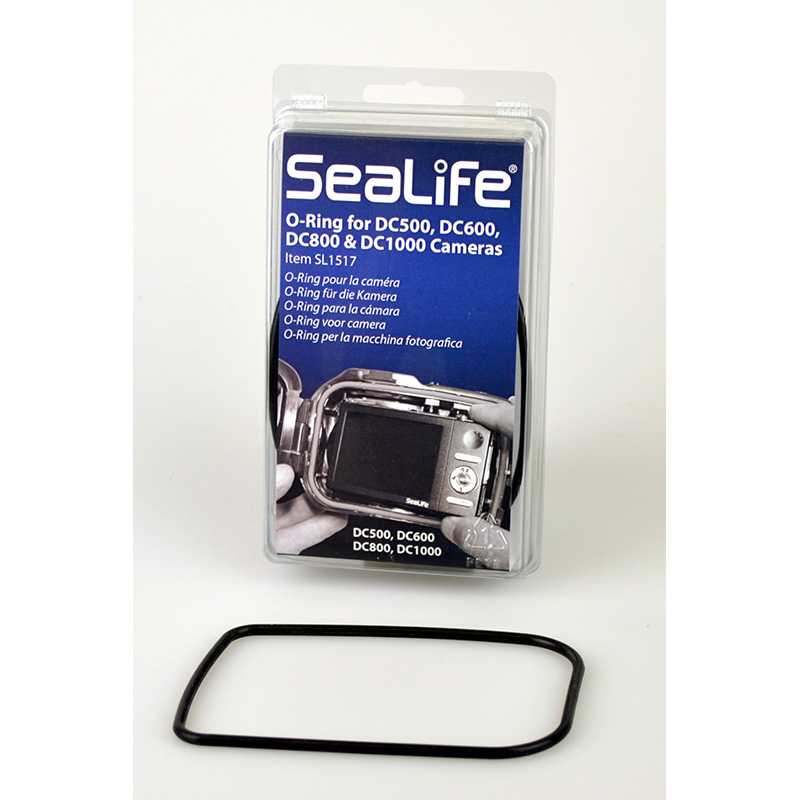
O-Ring for DC500 / 600 / 800 / 1000
Loading...
Loading...

How to Replace the DC-Series O-ring

How to replace the O-ring:

  • Lift and remove the O-ring from the groove using the O-ring removal tool.
  • Clean the O-ring grooves using a dampened, lint-free cotton cloth.
  • Do NOT apply O-ring lube to the O-ring.
    Don’t stretch the O-ring.
  • Install new O-ring in the groove being careful not to twist the O-ring.
  • Check that the O-ring is clean and evenly seated in its groove.


Additional information

Weight .05 lbs
Dimensions 7 × 4 × 1 in

Free Ground Shipping
on All $50+ USA Orders!

In Stock

O-Ring for DC500 / 600 / 800 / 1000

$14.95

SL1517

Replacement O-ring for SeaLife DC500, DC600, DC800 and DC1000 underwater cameras. O-ring does NOT require lubricant.

Free Ground Shipping on All $50 + USA Orders

Shop with an Expert.
We’re here to help.
Phone: 856-866-9191
Toll Free: 800-257-7742 (USA Only).

|
|
O-Ring for DC500 / 600 / 800 / 1000

Free Ground Shipping
on All $50+ USA Orders!

In Stock

O-Ring for DC500 / 600 / 800 / 1000

$14.95

SL1517

Loading...

Replacement O-ring for SeaLife DC500, DC600, DC800 and DC1000 underwater cameras. O-ring does NOT require lubricant.

Loading...

How to Replace the DC-Series O-ring

How to replace the O-ring:

  • Lift and remove the O-ring from the groove using the O-ring removal tool.
  • Clean the O-ring grooves using a dampened, lint-free cotton cloth.
  • Do NOT apply O-ring lube to the O-ring.
    Don’t stretch the O-ring.
  • Install new O-ring in the groove being careful not to twist the O-ring.
  • Check that the O-ring is clean and evenly seated in its groove.
 

Additional information

Weight .05 lbs
Dimensions 7 × 4 × 1 in

Free Ground Shipping on All $50 + USA Orders

Shop with an Expert.
We’re here to help.
Phone: 856-866-9191
Toll Free: 800-257-7742 (USA Only).